
In Woodbridge and across Prince William, customers notice the contractor who responds clearly. A polished logo can earn attention, but it cannot fix an estimate that disappears into email or a schedule update trapped on one employee’s phone.
This guide focuses on HVAC operators looking for a contractor website Woodbridge VA buyers can trust. The practical answer is a public website with customer and staff portals behind it, not another isolated brochure.
HVAC professionalism is the full response system
Professionalism begins before the technician arrives. The customer should understand the services offered, the area covered, and what happens after a request. The office should receive enough context to assign the next action. The technician should not arrive with an incomplete version of the conversation.
After the visit, the same standard continues. Estimates, decisions, schedule communication, and relevant history need a stable home. “We will text you” can be useful for a quick alert, but it is not a complete customer process.
When the work is strong but the handoffs feel improvised, the brand takes the blame. A portal system aligns the visible experience with the quality the crew is trying to deliver.
The public website should prepare the job, not only collect it
An HVAC site can distinguish repair needs, planned replacement, maintenance inquiries, and indoor-air-quality questions. That separation helps the customer choose a path and gives staff a more useful request than a blank message asking for a callback.
Pages should explain scope without making unsupported promises. Clear service-area language for Woodbridge and Prince William is more credible than fictional reviews, rankings, addresses, or “best contractor” claims.
Every local and service page should feed one intake process. If each landing page sends email to a different person, the marketing structure creates operational risk.
Woodbridge routes make visible status more valuable
Dispatch decisions depend on more than an open calendar slot. The office weighs urgency, technician fit, current job progress, and travel between calls. When updates live in group texts, the dispatcher spends time asking for information that should already be visible.
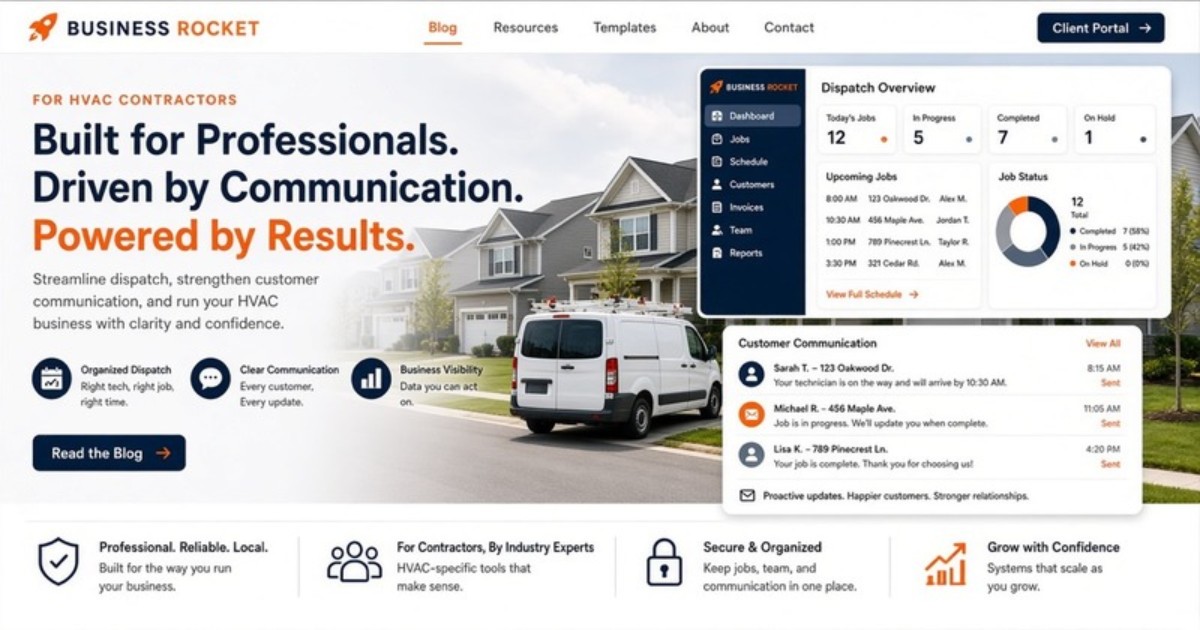
A staff portal provides a shared view of requests, ownership, and current status. It does not choose the route or make a judgment about an emergency. It gives the person making that decision a common record.
That visibility is useful when a diagnosis changes the day. The office can identify affected customers, update the next actions, and keep follow-up from depending on memory.
Customer portal: keep replacement choices organized
HVAC replacement work can involve multiple options and revised scope. Email attachments make it easy for a homeowner to open an older version. A branded customer portal can keep the current estimate and next step accessible in one place.
The portal also supports routine status communication. Customers can review what is available without calling dispatch for every question, while still having a clear path to a person when a decision or urgent concern requires conversation.
For returning customers, relevant history creates continuity. The office and homeowner can begin with shared context rather than rebuilding the story from old messages.
Staff portal: get field updates back to the office
Information flows in both directions. The office sends assignment context to the field, and the field returns findings or changes that affect the customer. A private text to one coordinator breaks that loop for everyone else.
The staff portal should make key updates durable and visible to the right team members. A technician does not need to write a report for every minor event. The workflow should capture the updates that change scope, status, schedule, or follow-up.
Simple ownership matters. Every open request needs a person or role responsible for the next action. A shared list without ownership becomes another inbox.
How the three surfaces connect
The public website serves people researching and requesting HVAC work. The customer portal serves active and returning customers. The staff/dispatch portal serves the office and field operation. Separate surfaces protect clarity and access while supporting one request path.
A homeowner submits a repair or replacement request. Staff see it in the operating view, qualify it, and assign the next step. Customer-facing information remains available in the branded portal. The company does not have to make the customer navigate an internal tool.
Business Rocket builds this three-surface structure as one product. Specialized accounting, inventory, or technician software can remain where it is useful. Business Rocket does not claim that its portal layer replaces deep route optimization or every full FSM feature.
Prince William local marketing should share one backend process
A Woodbridge page can speak directly to customers in that part of the service area. The Prince William County hub can explain broader coverage. The HVAC solution page can describe the product in more depth. Those pages have different marketing jobs but should not create different operating paths.
Consistent intake helps the office compare and prioritize requests without wondering which campaign produced a special spreadsheet. It also makes expansion easier because adding a location page does not require adding another manual workflow.
- Woodbridge location page
- Prince William County hub
- HVAC solutions for product depth
Set the portal workflow before adding more lead volume
More advertising sends more demand into the current process. If that process relies on texts and individual inboxes, additional leads can increase missed follow-up. Map the handoffs first: new request, qualification, assignment, estimate, customer decision, scheduling communication, field update, and closeout.
Choose a small status set the team will maintain. Define who reviews new requests and who updates the customer-facing record. The software should reinforce those decisions rather than hide an undefined process behind a dashboard.
Business Rocket scope and pricing
The core build is $2,500, including the public website, customer portal, staff portal, and lite brand onboarding. Hosting and care are $99/mo. Optional growth support is $399/mo after launch.
Business Rocket works with service operators across Loudoun, Fairfax, and Prince William. The Woodbridge guide keeps HVAC as the primary use case while using a system that can support the company’s wider NoVA coverage.
Compete on clarity from request to follow-up
Schedule a workflow demo, call (571) 600-2835, or email help@businessrocket.ai. Bring one recent HVAC request that became difficult to track. We will use the real handoffs to identify what belongs on the website, in the customer portal, and in the staff portal.
About Business Rocket Editorial
NoVA trade systems · Business Rocket
Practical guides on 3-surface web systems: public booking, client portal, and staff dispatch, for HVAC, plumbing, roofing, and home-service operators across Loudoun, Fairfax, and Prince William.
More from Business Rocket EditorialReady to upgrade from a static brochure to a 3-surface system?
We'll show you public site + client portal + staff portal configured for your service business.
Book a Demo →