
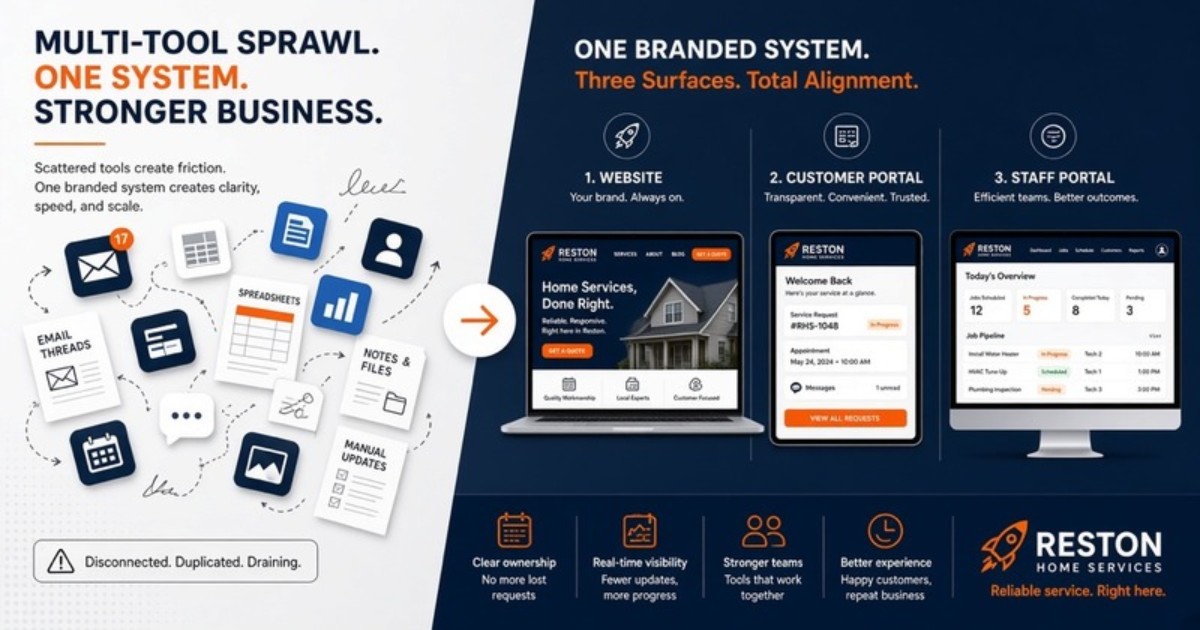
Reston-area home-service companies can end up paying for a website builder, form tool, chat widget, estimate email process, and scheduling app that barely communicate. Each purchase solves one immediate problem, but the customer experiences the seams.
For a home services website Reston buyers experience as one brand, start with three connected surfaces: public website, customer portal, and staff portal. Roofing and related exterior home services are the primary fit for this guide.
The five-login problem is really a handoff problem
Tool sprawl often begins reasonably. A form plugin improves intake. A scheduling product adds a calendar. A separate system sends estimates. A chat widget promises quicker contact. Over time, the office opens several tabs to answer one customer question.
The issue is not the number of passwords by itself. It is the missing ownership between tools. One system says the request was submitted, another holds the estimate, and the latest production update is in a text. Staff still have to assemble the current state manually.
Adding a sixth app rarely fixes the seam. The company first needs to decide where the branded front door, customer-facing record, and internal operating view belong.
Roofing projects create long communication arcs
Roofing work can stretch from initial concern through inspection, estimate review, material or scope decisions, scheduling, weather changes, production, and closeout. That is a longer communication path than a simple contact form suggests.
A homeowner may return to the process several times. If each stage arrives from a different tool or employee, the experience feels fragmented. An older estimate attachment may remain in the inbox after a revision. A schedule update may reach one household contact but not another.
The portal layer gives that communication arc a stable branded home. It does not guarantee a weather-dependent schedule or remove the need for direct calls. It keeps the information both sides rely on easier to find.
What belongs on the public Reston-area website
The public site should explain services, coverage, and the next step. Roofing repair, replacement, inspection, gutters, siding, and other home-service categories can have distinct pages and intake paths when they reflect the operator’s actual scope.
Local pages should provide useful context without invented reviews, project counts, rankings, or addresses. Business Rocket does not manufacture proof. Clear language and an organized request path are more useful than unsupported local claims.
The form should collect enough information to route the request, remain easy to complete on a phone, and feed the staff workflow directly. A successful submission should not create a manual copy-and-paste task.
Customer portal: one place for the current project record
The customer portal holds customer-facing estimates, relevant history, status, and next steps. It gives the homeowner a consistent destination instead of asking them to search across separate email senders and links.
For estimate revisions, the current version should be clear. For scheduling communication, the portal can show the present customer-facing state while the office calls directly when a significant change needs explanation.
Good portal design avoids exposing internal clutter. Customers need the information that helps them make decisions and understand the next step, not every note used by production staff.
Staff portal: connect intake, sales, and production handoffs
The staff portal gives the company an internal view of ownership and status. New requests, inspection follow-up, estimate decisions, scheduling dependencies, and closeout tasks should not disappear because one employee is away from the inbox.
Roofing and exterior projects often move between office, sales, and production roles. The staff view should make the next handoff explicit. A shared status without a responsible person is only a more attractive queue.
Weather changes and field findings still require judgment. The portal supports those decisions by keeping the current record visible. It does not attempt to automate every exception.
Consolidate the experience without forcing every tool out
Connection does not always mean replacing all existing software. A specialized accounting, measurement, payment, or field tool may continue to earn its place. The goal is to stop making the customer and office navigate the gaps.
Business Rocket focuses on the branded three-surface layer. The public website captures and explains demand. The customer portal provides continuity. The staff portal supports intake and handoffs. It is not positioned as heavy inventory or advanced route-optimization software.
During planning, identify which existing tools remain systems of record and which duplicate work the portals can simplify. Clear boundaries prevent staff from updating the same status in several places.
A Reston-area intake path should handle property context
Reston-area requests may involve individual homeowners, property contacts, or projects with additional coordination. The public intake should gather the right contact and service context without attempting to resolve every property-specific detail in a form.
The office can then qualify the request in the staff portal and decide who needs to participate. Customer-facing updates belong in the customer portal, while internal notes remain restricted to staff.
This is a different local angle from a storm-volume article. The challenge here is coordinated communication across a longer project and an area where the person requesting work may need a clean record to share with others.
Keep local pages connected to one Fairfax process
The Reston location page can address the immediate market. The Fairfax County hub can explain wider coverage. The roofing and home-services solution page can describe the three-surface product. All three should route into the same operating path.
Business Rocket works with NoVA operators across Loudoun, Fairfax, and Prince William. A company can market locally without creating a separate inbox, portal, or status vocabulary for every city page.
Replace tool sprawl with a defined operating front door
Begin by tracing a recent roofing or exterior-service request. Note where information moved from the site to email, into an estimate tool, through customer communication, and back to production. Mark every place staff copied details or had to ask someone for the latest state.
Then assign the three surfaces. Public information and intake belong on the website. Customer-facing records belong in the customer portal. Internal ownership and handoffs belong in the staff portal. Existing specialty tools should have explicit boundaries.
Business Rocket scope and next step
The core three-surface build is $2,500 and includes lite brand onboarding. Hosting and care are $99/mo. Optional ongoing growth support is $399/mo after launch. The growth service is separate from the working website and portals.
Talk to Business Rocket, call (571) 600-2835, or email help@businessrocket.ai. Bring the list of tools your office currently opens for one job. We will map which ones remain and where a connected portal layer can remove the duct tape.
About Business Rocket Editorial
NoVA trade systems · Business Rocket
Practical guides on 3-surface web systems: public booking, client portal, and staff dispatch, for HVAC, plumbing, roofing, and home-service operators across Loudoun, Fairfax, and Prince William.
More from Business Rocket EditorialReady to upgrade from a static brochure to a 3-surface system?
We'll show you public site + client portal + staff portal configured for your service business.
Book a Demo →