
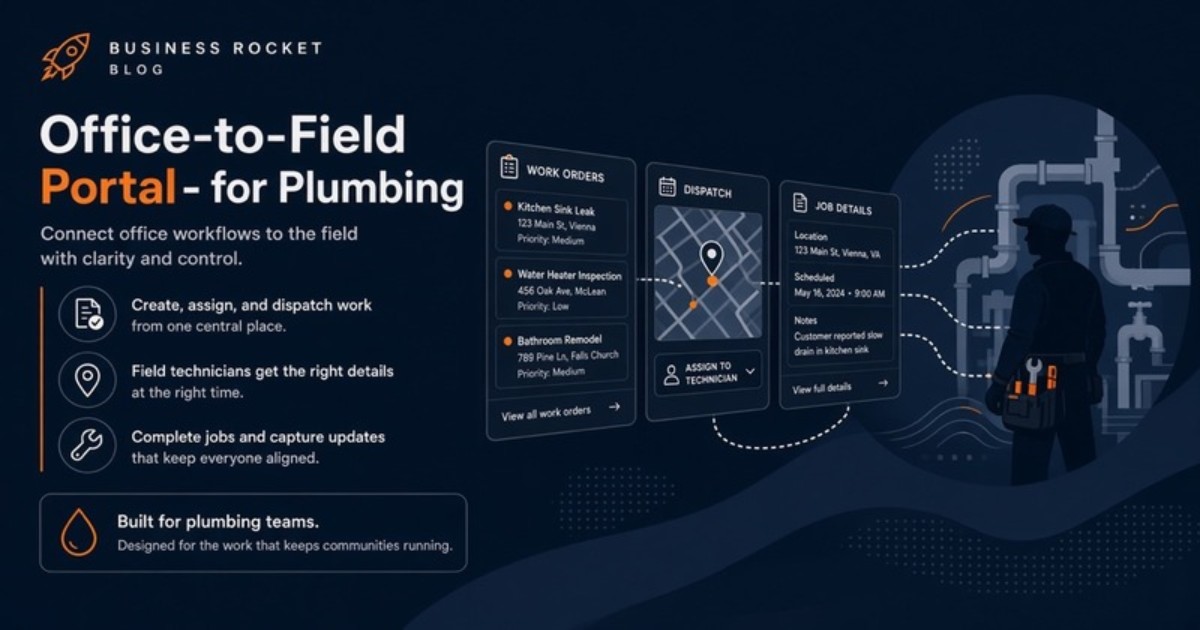
Established Fairfax plumbing shops rarely need startup theater. They need process maturity: fewer lost threads, clearer ownership, and a website that feeds an operating workflow instead of adding another inbox.
If you are searching for a plumbing website Fairfax teams can run day to day, begin with the way work moves. The useful product connects a public website, customer portal, and staff/dispatch portal under one brand.
Growing past the owner-in-the-inbox model
Many plumbing companies build their early process around one person. The owner sees form emails, answers the phone, remembers prior customers, and tells technicians where to go. That knowledge can be a strength, but it becomes a bottleneck when every decision must pass through the same phone.
Growth multiplies interruptions. An office manager needs a status update. A technician needs the latest scope. A customer asks whether an estimate was received. If the owner remains the integration between those conversations, adding work does not create leverage.
A portal layer moves routine information into shared, appropriate places. The owner can still handle judgment-heavy decisions without being the only person who knows the current state.
Build intake around the reason for the plumbing call
A public website should help the office understand the request before the callback. An active leak, a water-heater concern, a planned fixture project, and a remodel walkthrough require different timing and preparation. One generic contact box gives the dispatcher very little context.
Useful intake stays concise. It can identify the service type, preferred contact method, general property area, and a short description. The form should work well on a phone and set an honest expectation for the next step.
Most important, the submission should enter the staff workflow. If an employee must copy the form into a spreadsheet and then paste it into a group text, the website has only moved the manual work.
Staff portal: make dispatch ownership visible
Fairfax plumbing schedules can change quickly. An emergency arrives during a planned job. A diagnosis changes the expected duration. A technician needs a part before returning. Dispatch needs a current view, not a perfect schedule frozen at opening time.
The staff portal should show new requests, the person responsible, present status, and the next action. Office staff can see what needs attention without searching personal inboxes. Technicians can return key updates to a shared record rather than sending them to only one person.
This does not automate the hard dispatch choices. It gives the dispatcher enough common information to make them. Human judgment remains central, especially when urgency and customer expectations conflict.
Customer portal: status without repeated phone tag
Customers often call because silence leaves them unsure. A branded portal can make the current estimate, relevant history, and next step easier to find. Routine visibility reduces avoidable calls while preserving direct contact for urgent or complicated issues.
The portal also helps with revised work. When scope changes, customers should have a clear customer-facing version rather than several attachments with similar names. The office can point to one location and continue the conversation from the same information.
A customer portal is not a promise that every field event will update itself. The team still needs a simple process for keeping status current. Technology makes that process visible; it does not excuse unclear ownership.
Separate the three audiences instead of forcing one dashboard
The public site serves prospects and customers researching services. The customer portal serves people with an active or prior relationship. The staff portal serves the office and field team. Each audience has different permissions and questions.
Combining everything into a single overloaded page creates friction. The three-surface model keeps the experiences distinct while connecting the request path. Public intake becomes visible to staff, and approved customer-facing information can appear in the customer portal.
Business Rocket builds those three surfaces as one product. It can sit alongside specialized bookkeeping, inventory, or field tools already used by the shop. It is not sold as deep route optimization or an enterprise replacement for every operational platform.
Use a simple status language the whole office understands
Mature operations do not require dozens of stages. They require shared meanings. A small set of statuses can show that a request is new, assigned, waiting for customer input, scheduled, or ready for follow-up. The exact labels should match how the company speaks.
Each status needs an owner and a clear next action. “Waiting” is not useful if nobody knows what is being awaited or who will check again. During setup, Business Rocket maps these handoffs with the people who actually run them.
The goal is fewer side explanations. A staff member joining mid-day should be able to understand the active queue without a complete verbal reconstruction.
Fairfax County coverage needs one operating path
A plumbing company may market to several communities across Fairfax County while dispatching from one shared office process. Local pages can answer area-specific questions, but they should not create separate inboxes or inconsistent promises.
Centreville is the primary city link for this article, while the county hub provides the wider context. Both should route requests into the same staff view. Business Rocket also supports operators across Loudoun and Prince William when their coverage extends beyond Fairfax.
We do not invent local customers, job volumes, reviews, district rankings, or street addresses. Useful local content reflects real service-area decisions and a clear customer path.
- Fairfax County hub
- Centreville (primary city link for this piece)
- Plumbing solutions
Know what the Business Rocket scope includes
The core build is $2,500. It includes the public website, customer portal, staff/dispatch portal, and lite brand onboarding. Hosting and care are $99/mo after launch. Optional ongoing growth support is $399/mo.
The optional growth service can help after the operating front door is live. It does not replace the portal system, and the portal system does not require unsupported claims to market locally.
Map one job from request through follow-up
Contact Business Rocket to trace your current text-and-spreadsheet flow. Call (571) 600-2835 or email help@businessrocket.ai. Use one recent emergency, estimate, or revisit as the example. The points where staff copy information or ask the owner for status are the first candidates for a better portal workflow.
About Business Rocket Editorial
NoVA trade systems · Business Rocket
Practical guides on 3-surface web systems: public booking, client portal, and staff dispatch, for HVAC, plumbing, roofing, and home-service operators across Loudoun, Fairfax, and Prince William.
More from Business Rocket EditorialReady to upgrade from a static brochure to a 3-surface system?
We'll show you public site + client portal + staff portal configured for your service business.
Book a Demo →