
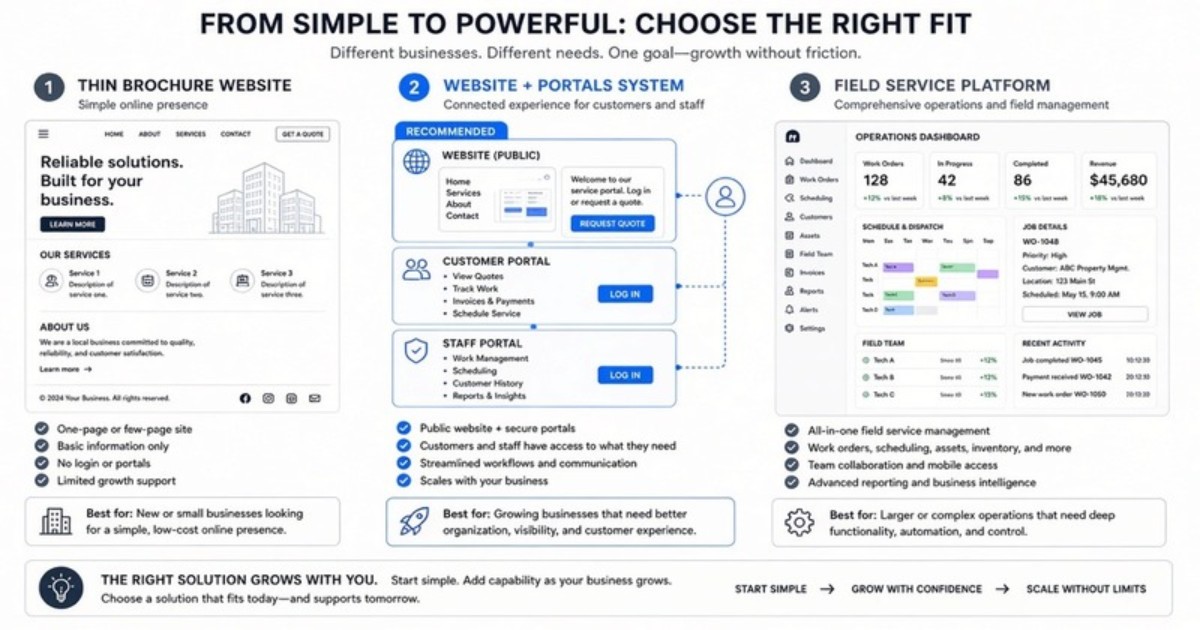
Web design proposals and field-service software demos often solve different problems while using similar language. One vendor is selling a polished brochure. Another is selling a system intended to run much of the field organization. Many trade operators need a layer between those options: a branded website with customer and staff portals.
A useful brochure website vs client portal comparison starts with the work each category is designed to handle. The right choice follows the operating gap, not the longest feature list.
What a brochure website is built to do
A brochure site establishes a public presence. It can present services, coverage areas, company information, photos, and contact forms. For a small operation that only needs a credible digital business card, that may be enough.
The boundary appears after the form is submitted. A brochure site normally does not own estimate review, customer history, status communication, or office-to-field handoffs. The request enters email, then staff move it through texts, spreadsheets, and other software.
That is not a defect if the buyer asked only for marketing pages. It becomes a mismatch when the operator expects the website project to fix follow-up. A visual redesign cannot organize work it never sees.
Where brochure-only projects create hidden costs
The visible cost is the design and build. The hidden cost is the manual bridge between the new site and the existing process. Someone must review notifications, copy details, assign follow-up, send the latest estimate, and answer routine status calls.
As request volume grows, those small actions become a job of their own. Information is duplicated and then drifts. The public site may look organized while the customer receives attachments from one employee and schedule updates from another.
A brochure can still be the correct choice. The operator should simply price the missing workflow honestly rather than assuming a contact form equals a customer system.
What Business Rocket’s three surfaces add
Business Rocket combines a public website, customer portal, and staff/dispatch portal as one branded product. Each surface has a distinct job. The website explains and captures demand. The customer portal keeps customer-facing information accessible. The staff portal supports ownership, status, and handoffs.
That structure gives the request a path after submission. Staff can work from a shared record instead of treating an email inbox as dispatch. Customers can review relevant estimates, history, and next steps without searching through messages.
Lite brand onboarding is included. The core build is $2,500, followed by $99/mo for hosting and care. An optional $399/mo growth add-on is available after launch. The growth service supports ongoing marketing work; it is not required to make the three surfaces function.
What full field-service platforms optimize for
Full FSM platforms are designed for deeper field operations. Depending on the product and configuration, that can include advanced scheduling, technician workflows, routing, inventory, estimating, payments, reporting, and integrations. Their value case is broader than the public website.
Operators evaluating this category should use each vendor’s current documentation and demo. The official homepages for Jobber, Housecall Pro, and ServiceTitan are the appropriate starting points because product capabilities and packaging can change.
These platforms are not failed website builders, and a brochure agency is not a failed FSM vendor. They occupy different categories. The buying mistake is expecting one category to deliver the core outcome of another without confirming the workflow.
Comparison: choose by capability and buyer goal
| Capability | Brochure site | Business Rocket 3-surface | Full FSM platform |
|---|---|---|---|
| Public marketing pages | Yes | Yes | Varies / add-ons |
| Branded customer portal | No | Yes | Often yes (product-specific) |
| Staff / dispatch workspace | No | Yes | Yes (deep) |
| Heavy inventory / advanced routing | No | Not the focus | Yes |
| Typical buyer goal | “Look open” | “Front door + portals” | “Run the whole field org” |
The table describes category intent, not a guarantee about every vendor plan. Full FSM products vary, and features may depend on configuration. Business Rocket focuses on the branded three-surface layer rather than heavy inventory or advanced routing.
No competitor pricing is listed here. Current pricing should come from the vendor, and a useful comparison should include implementation effort, staff adoption, required integrations, and the functions the shop will actually use.
Decision path 1: you only need a credible public presence
Choose a brochure site when the existing operating process already works and the public presentation is the clear gap. The team may have another system for intake, estimates, customer communication, and dispatch. In that case, adding portals could duplicate a process that is already healthy.
Confirm where form submissions go, who owns follow-up, and how the site will be maintained. A smaller scope can be a sound decision when the boundaries are explicit.
Decision path 2: your brand and follow-up are disconnected
Choose the Business Rocket three-surface model when the public site, customer communication, and office visibility need to become one path. Common signals include forms trapped in email, estimates scattered across attachments, customers calling for routine status, and staff assigning work in group texts.
The aim is not to reproduce every field-service feature. It is to give the company one branded front door and a practical portal layer. This can be particularly useful for HVAC, plumbing, roofing, and other home-service operators across Loudoun, Fairfax, and Prince William.
Decision path 3: deep field operations are the primary requirement
Evaluate full FSM platforms when advanced dispatch, route optimization, inventory, technician controls, or broad financial workflows drive the project. Build a requirements list from the way the company operates, then test those requirements in demos.
Ask who will administer the system, how data will migrate, what technicians must do in the field, and which customer-facing experience comes with the chosen setup. A powerful platform still needs ownership and adoption.
You may also need both categories. A full FSM platform can run deep operations while a branded public and portal layer handles the market-facing experience. Confirm integration boundaries before buying overlapping features.
Questions to answer before signing either proposal
- Where does a website request appear, and who owns the first response?
- Can a customer find the current estimate and next step without asking the office to resend it?
- Can staff see request status without opening personal inboxes or phones?
- Which existing tools must remain, and what information needs to move between them?
- Do you need deep inventory and routing, or is the immediate gap the branded front door and portal layer?
- Who will maintain content, permissions, statuses, and staff adoption after launch?
These questions expose the actual scope. A long proposal can still leave the central handoff unresolved, while a focused system can create more value by fixing the point where work currently disappears.
Map the workflow before comparing screens
Start with one real request. Follow it from search or referral to the public site, staff intake, estimate, customer decision, scheduling communication, field update, and closeout. Mark every place information is copied or a person becomes the only source of truth.
Then decide which category owns each step. The brochure site may own only the first few. Business Rocket can own the branded website and portal path. A full FSM platform may own a much deeper operating chain. Clear boundaries prevent double entry and disappointed expectations.
See the Business Rocket layer in context
Review HVAC solutions, plumbing solutions, and Business Rocket pricing. The three-surface product is $2,500 plus $99/mo, with optional $399/mo growth support after launch.
Use the contact page, call (571) 600-2835, or email help@businessrocket.ai to map the current process. A short workflow review will show whether the missing layer is a brochure, connected portals, or deeper FSM software.
About Business Rocket Editorial
NoVA trade systems · Business Rocket
Practical guides on 3-surface web systems: public booking, client portal, and staff dispatch, for HVAC, plumbing, roofing, and home-service operators across Loudoun, Fairfax, and Prince William.
More from Business Rocket EditorialReady to upgrade from a static brochure to a 3-surface system?
We'll show you public site + client portal + staff portal configured for your service business.
Book a Demo →